1KE turns the delivery work in your solution model into a phased work breakdown, with people, hours and prices for each work package. Where your service catalogue cannot supply a suitable estimate, AI suggests the effort and explains its reasoning for you to review.
AI estimates are suggestions. They only count toward totals after you accept them or save your edits.
All users can review and edit estimates. Only admins can update the Institutional Profile.
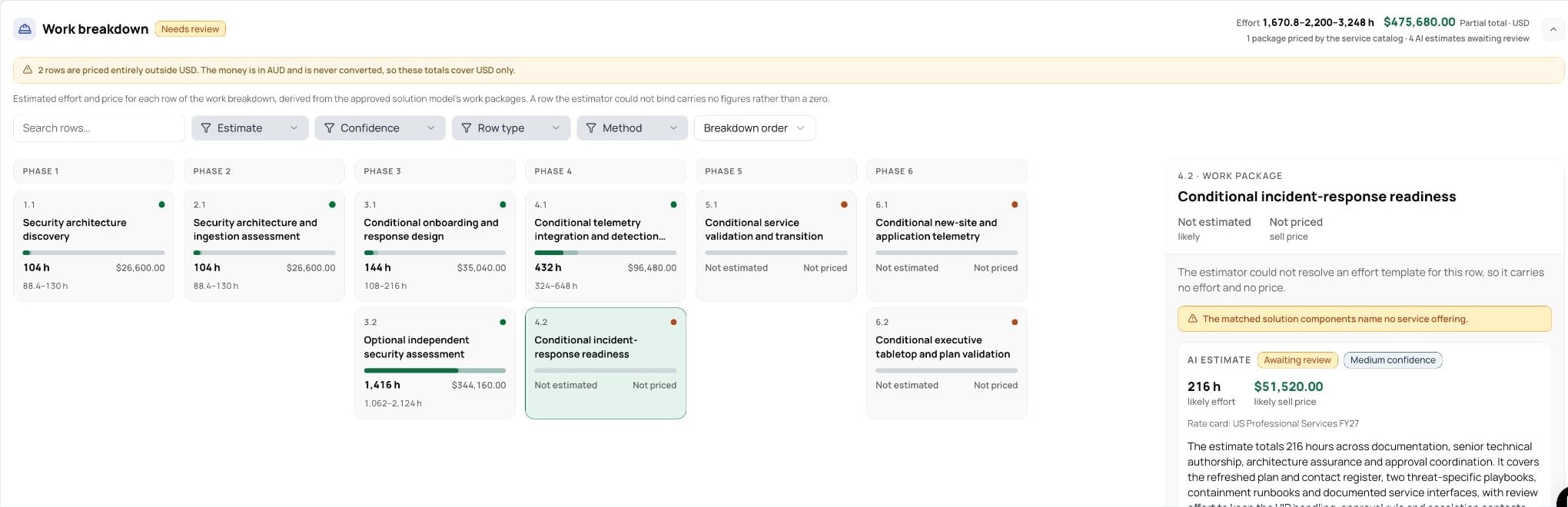
The work breakdown is generated automatically with the solution model, so it is tied to that version of your technical solution. You do not generate the work breakdown separately.
Open Solutioning and complete the solution-strategy review and approval.
Generate the solution model. As part of that run, 1KE builds the Work Breakdown and Commercial Model for the same solution version, including AI effort suggestions where needed.
Once generation finishes, select Work Breakdown to review the delivery work.
If your solution model is already generated, go straight to Work Breakdown. There is no need to regenerate it just to open this view.
Tip: use Focus mode. Select the diagonal expand icon at the top right of the Solutioning panel for more room. Use the exit icon or press Escape to return.
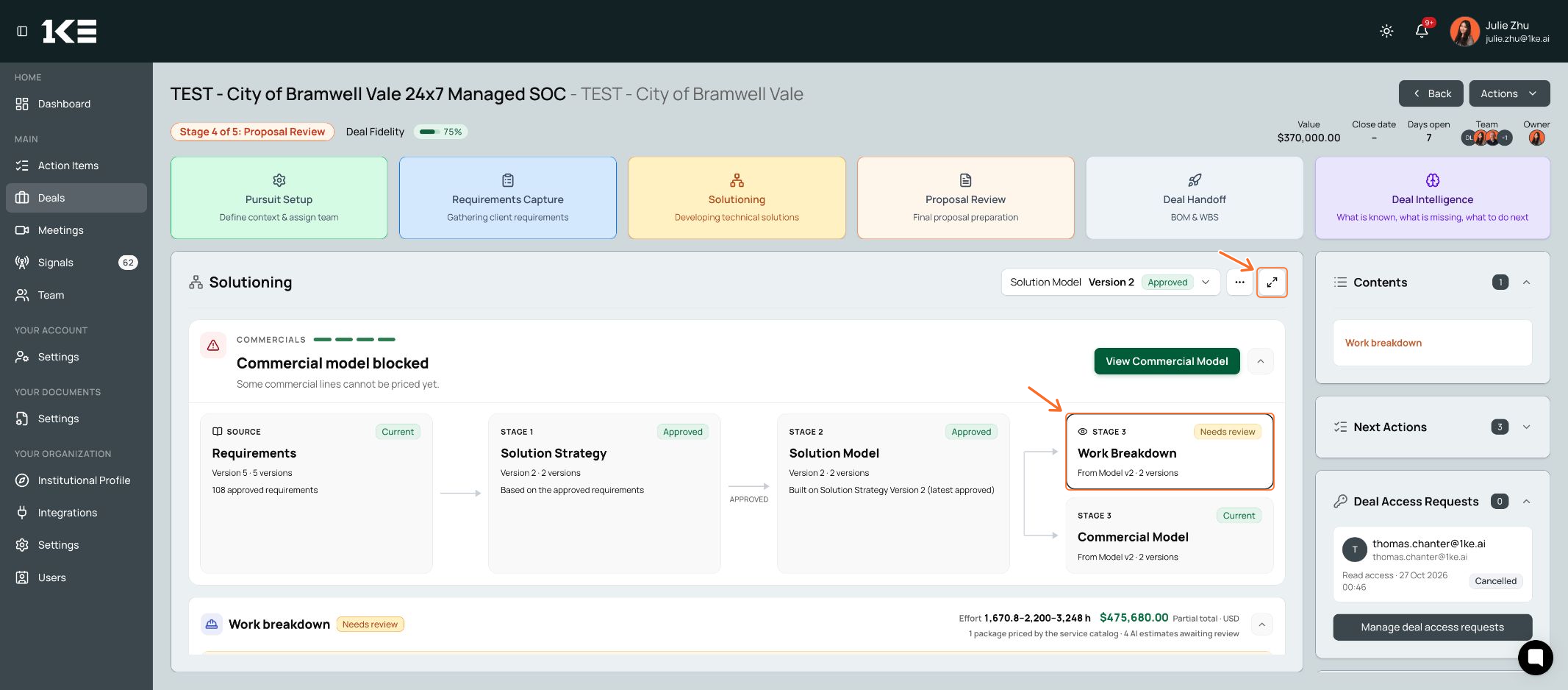
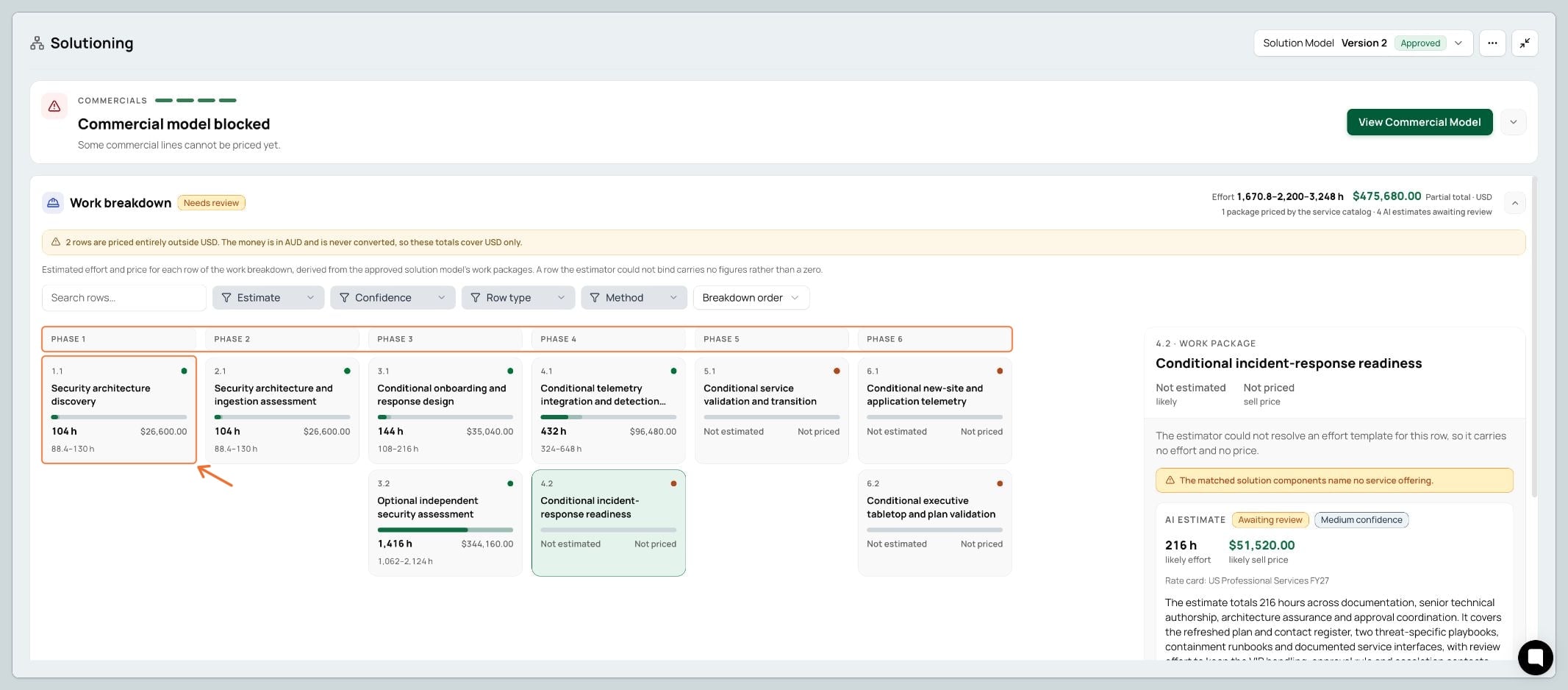
A work breakdown divides the delivery scope into manageable pieces. Each column is a phase; each work-package card is a piece of work in that phase.
1.1 is the first work package in Phase 1. 2.1 is the first in Phase 2. 3.2 is the second in Phase 3.
Each card shows the package name, estimate status and, when available, likely hours, an effort range and a sell price. Not estimated or Not priced means that figure is not yet available; it does not mean zero.
The solid bar shows likely effort; the lighter part extends to the higher estimate. Bars share a scale so you can compare the work packages.
The card shows the package total. Open it to see the individual roles, people and hours behind that total.
The solution model defines the delivery work. Its work packages and phases become the work breakdown. The work is grounded in the solution’s requirements, deliverables and dependencies.
1KE looks for matching catalogue services and effort templates. A suitable template supplies a standard role mix and effort for the package.
If a suitable match or template is missing, AI suggests effort. It uses the package’s scope and evidence to suggest roles, people and hours, and explains its reasoning. This does not automatically add a new service or template to your catalogue.
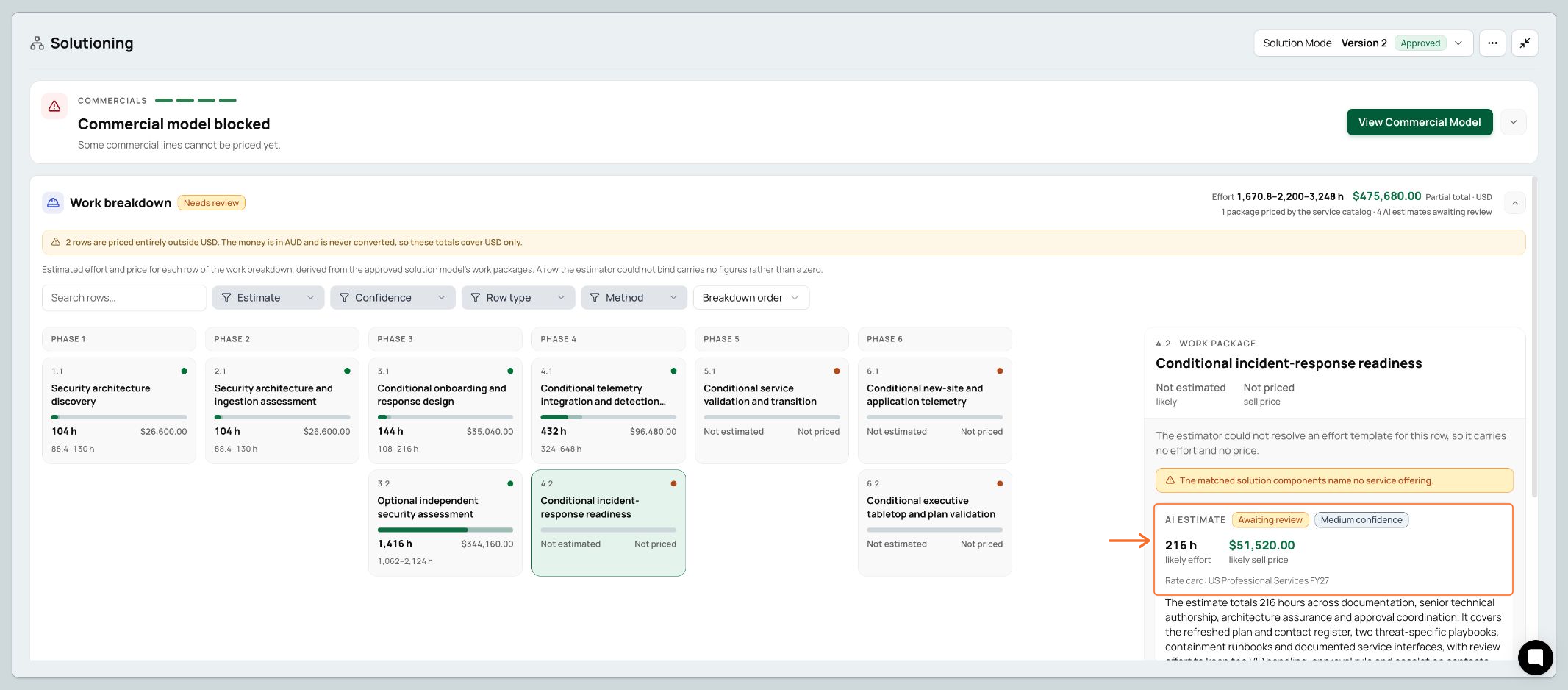
Select a work-package card. Its detail panel shows the suggested effort and price. In this example, the AI estimate is 216 hours, with Medium confidence and a likely sell price of $51,520 USD.
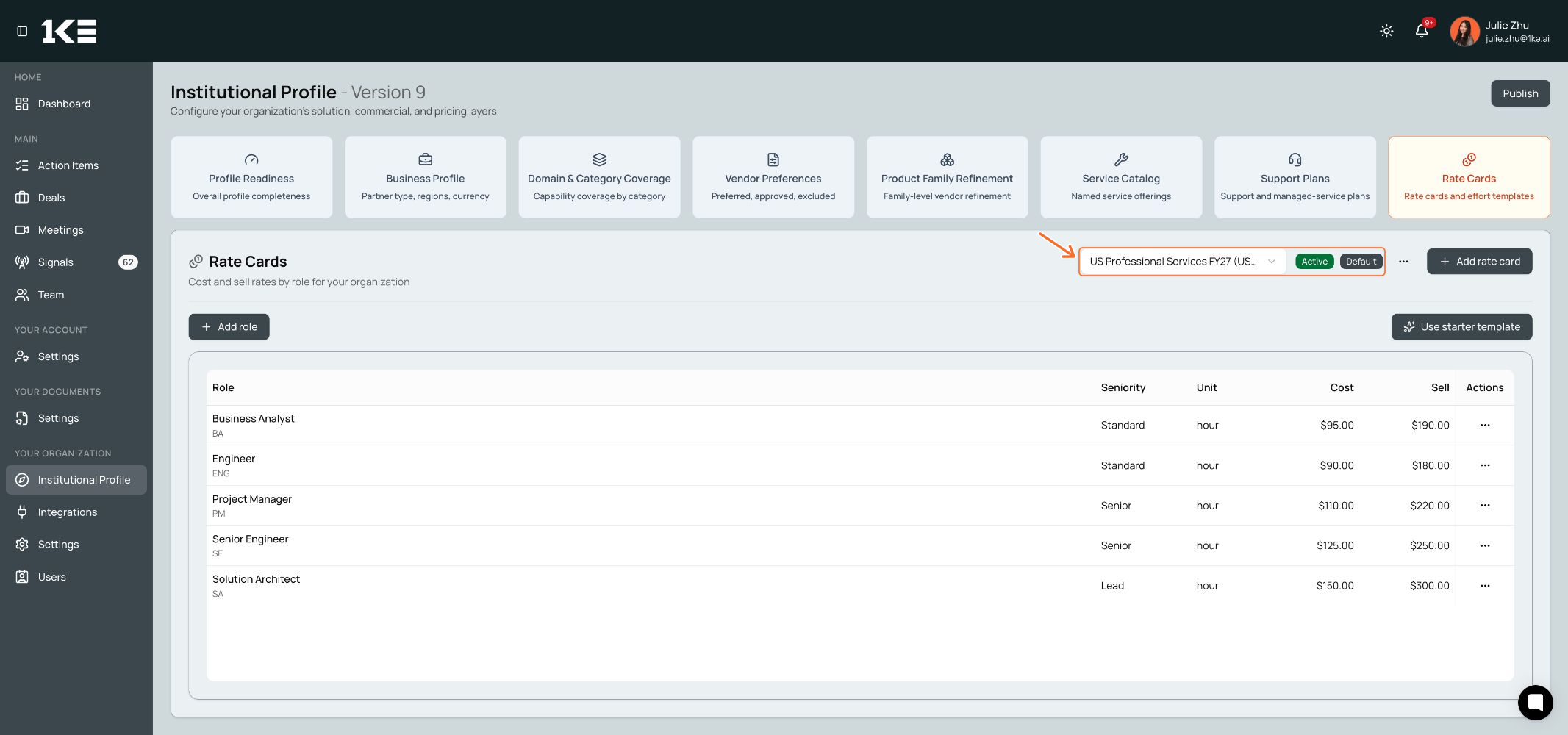
The named rate card supplies the role rates used to calculate that price. See the rate-card example in section 6.
The AI explains its rationale beneath the summary. Continue down the same panel to Roles for the people, hours and reason behind each role. Use Show more to read a role’s full explanation.
The same 216-hour suggestion breaks down into:
Business Analyst: 1 person × 56 h = 56 h
Senior Engineer: 1 person × 104 h = 104 h
Solution Architect: 1 person × 32 h = 32 h
Project Manager: 1 person × 24 h = 24 h
56 + 104 + 32 + 24 = 216 hours. The orange boxes below show the rationale and role detail after scrolling down.
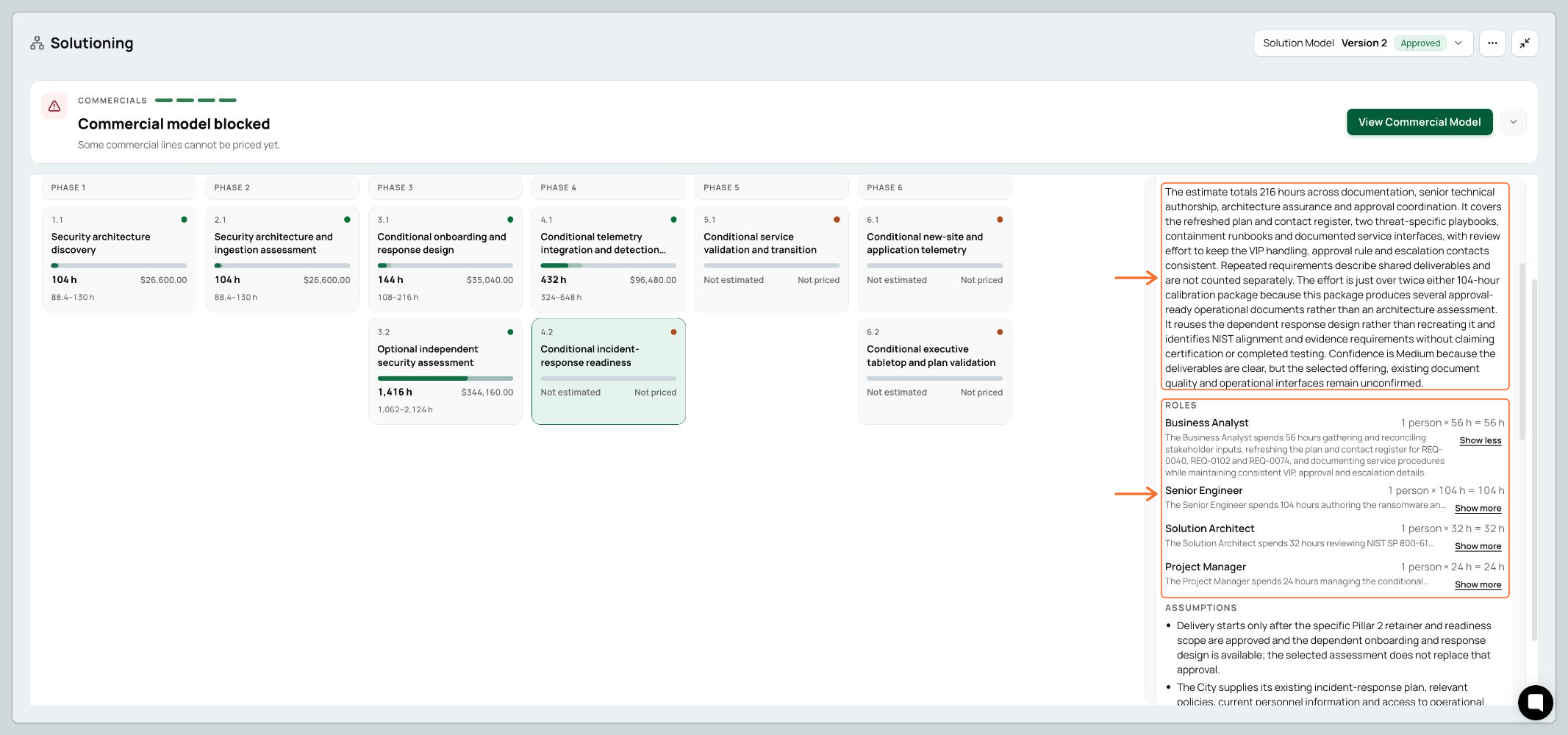
Review the assumptions and evidence too. These explain what is included and what the estimate relies on. Hours describe work effort, not automatically the time it will take on a calendar.
Why does 1KE check effort templates first? See the FAQ below.
Accept if the scope, role mix and effort are appropriate. The accepted estimate can then price the package.
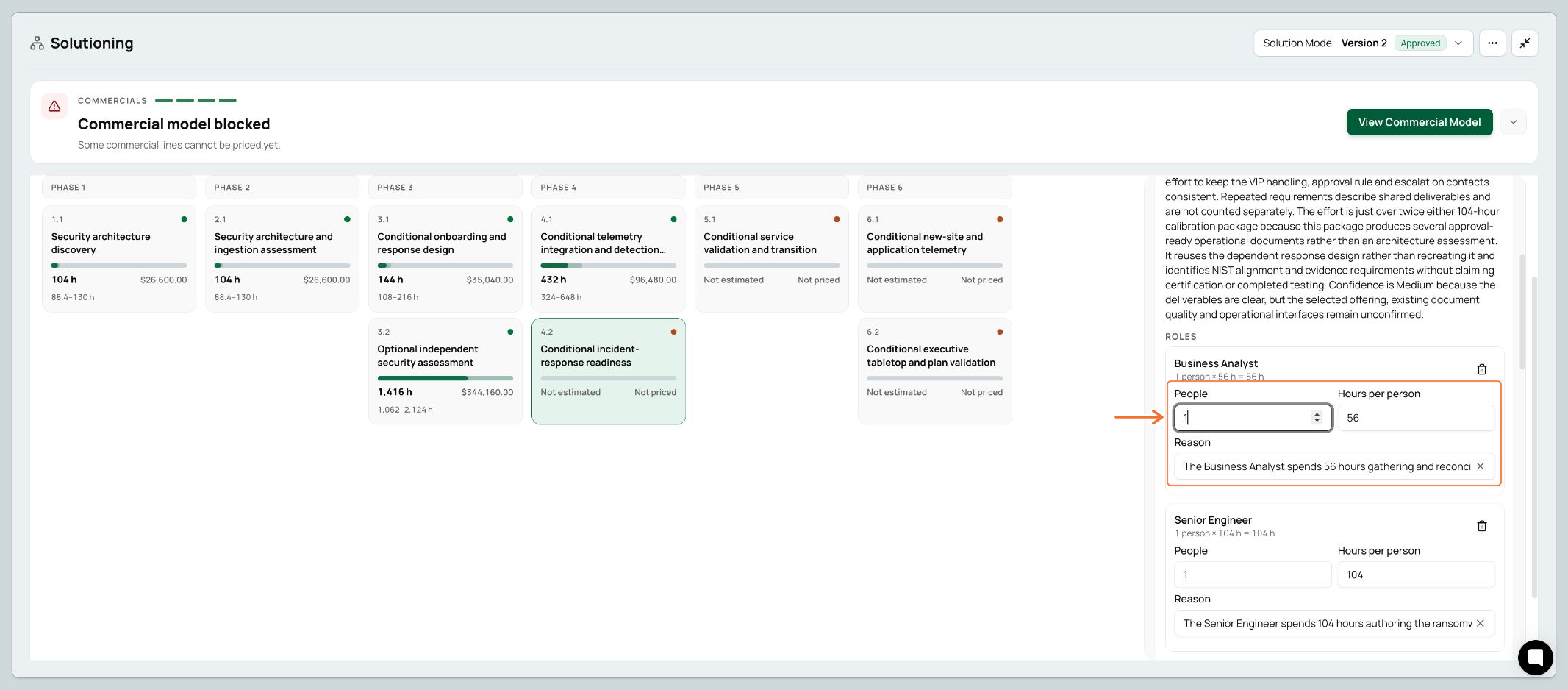
Edit to change People, Hours per person or the Reason for a role. Save estimate saves and accepts your revised figures.
Dismiss if you do not want to use the suggestion. It adds no price and cannot be restored on that version; a new solution version can suggest a fresh estimate.
Use Cancel to leave the edit form without saving.
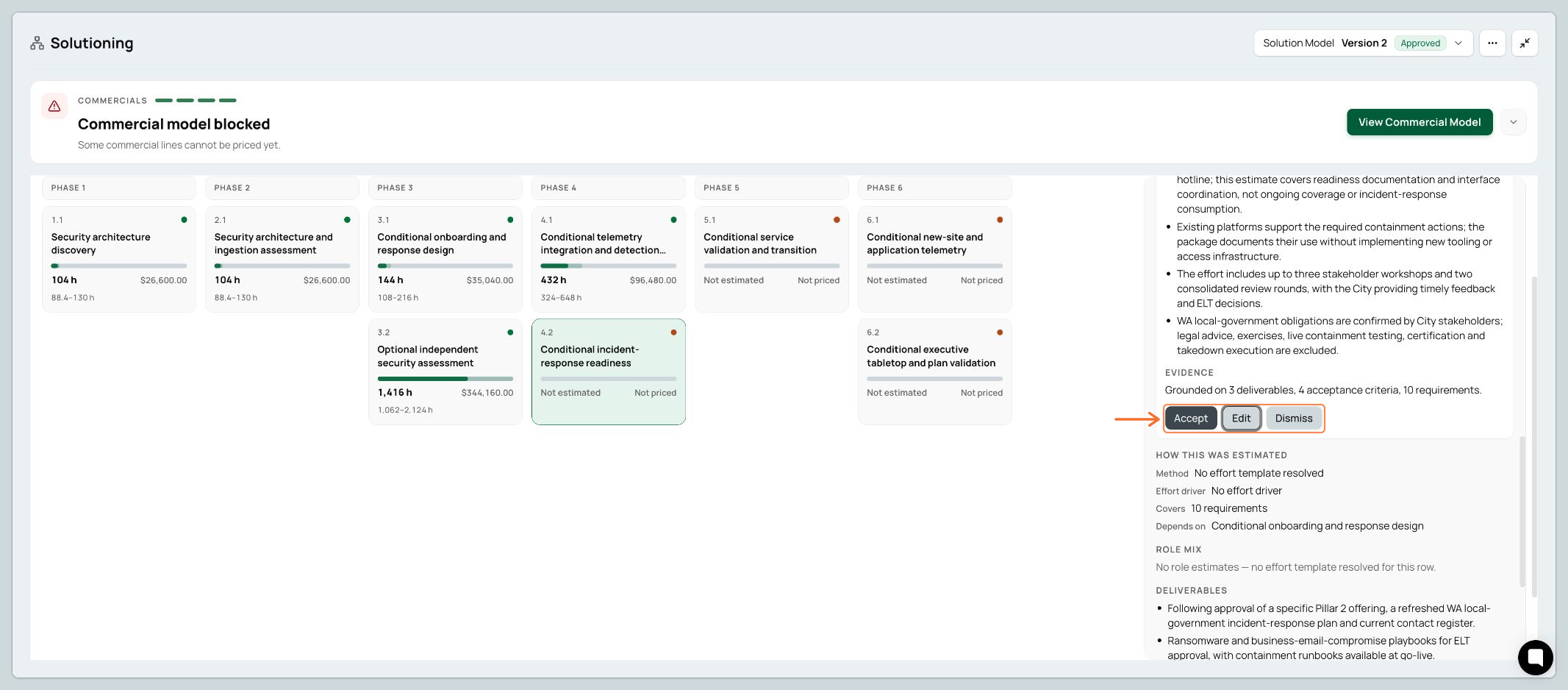
Open Commercial Model from the Solutioning workflow. Accepted estimates appear in Commercials; a separate work-package line is labelled AI estimate and uses 1 engagement.
To change the underlying effort, return to Work Breakdown and edit the estimate. For a commercial adjustment to a work-package line, use Actions → Override to set a discount or uplift.
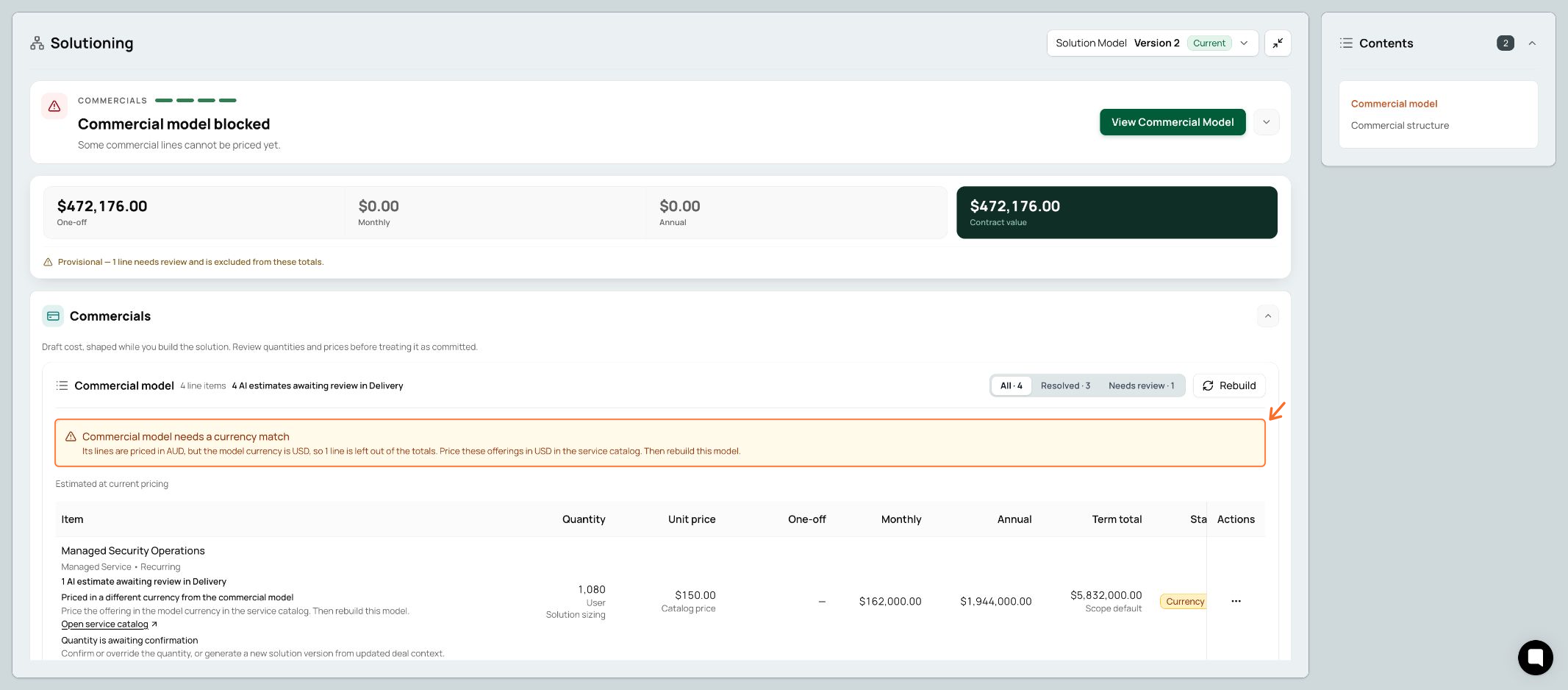
Check the one-off and recurring amounts, currency and contract value. Estimates awaiting review are still excluded.
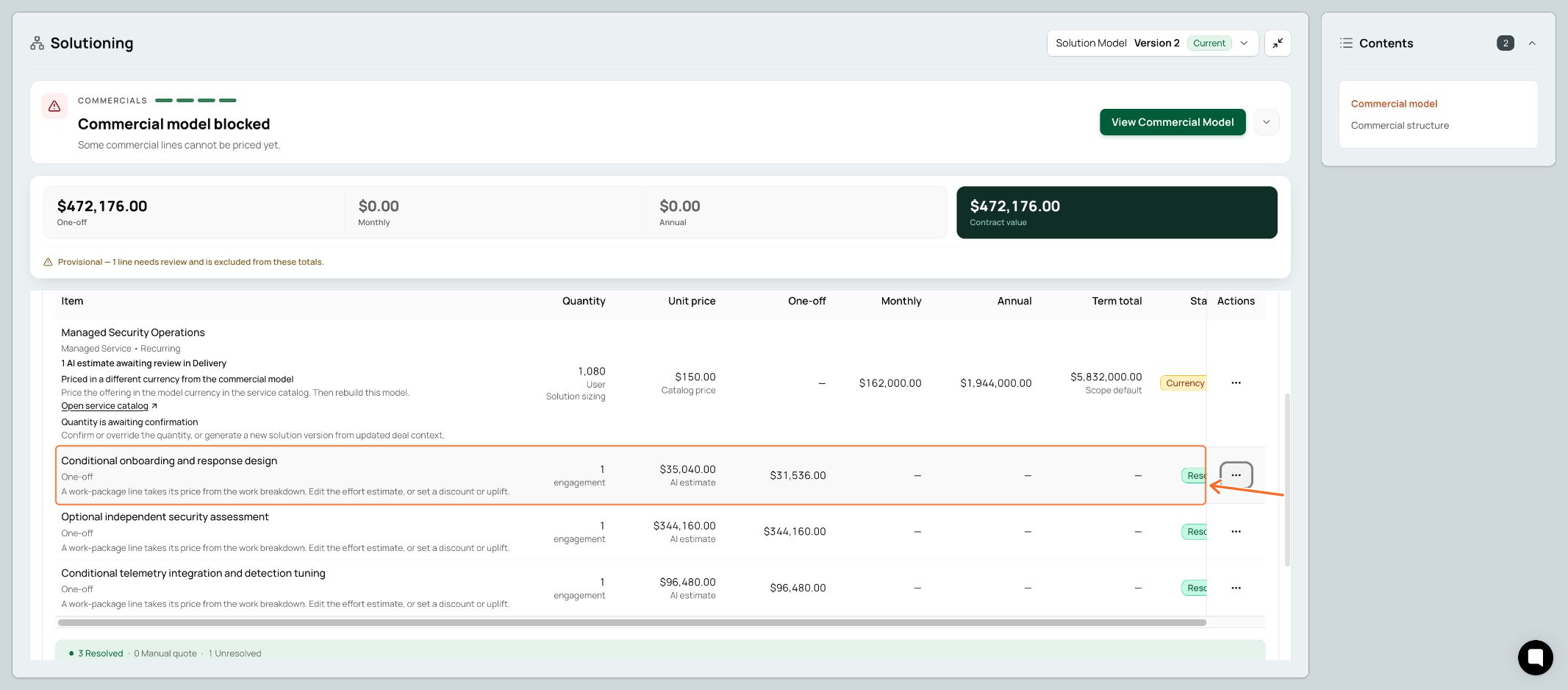
The onboarding line in this example already has a 10% discount, so its one-off amount is lower than its AI-estimated unit price.
A provisional or partial total is not the full deal price. Read the explanation on each line marked Needs review and follow its suggested fix.
What you see | What to do |
|---|---|
Quantity awaiting confirmation | Check the sizing and confirm or override the quantity. If the scope changed, update the deal context and generate a new solution version. |
Currency mismatch | Ask an admin to check the offering’s price and currency in the Service Catalogue. The app does not automatically convert the excluded amount. |
No AI estimate or usable rate card | Ask an admin to check that an active rate card covers the required roles and currency. Then generate a new solution version using the updated profile. |
Priced by the service catalogue | Check the linked catalogue line. The service owns the sell price, so the work package does not add another sell price. An accepted AI estimate may contribute effort only. |
Admins: open Institutional Profile to maintain the pricing inputs used across deals.
A rate card holds the hourly or daily cost and sell rates for delivery roles, in one currency. Select Rate Cards, then choose or add the appropriate card. Check its currency, active/default setting, roles, billing units, cost rates and sell rates.
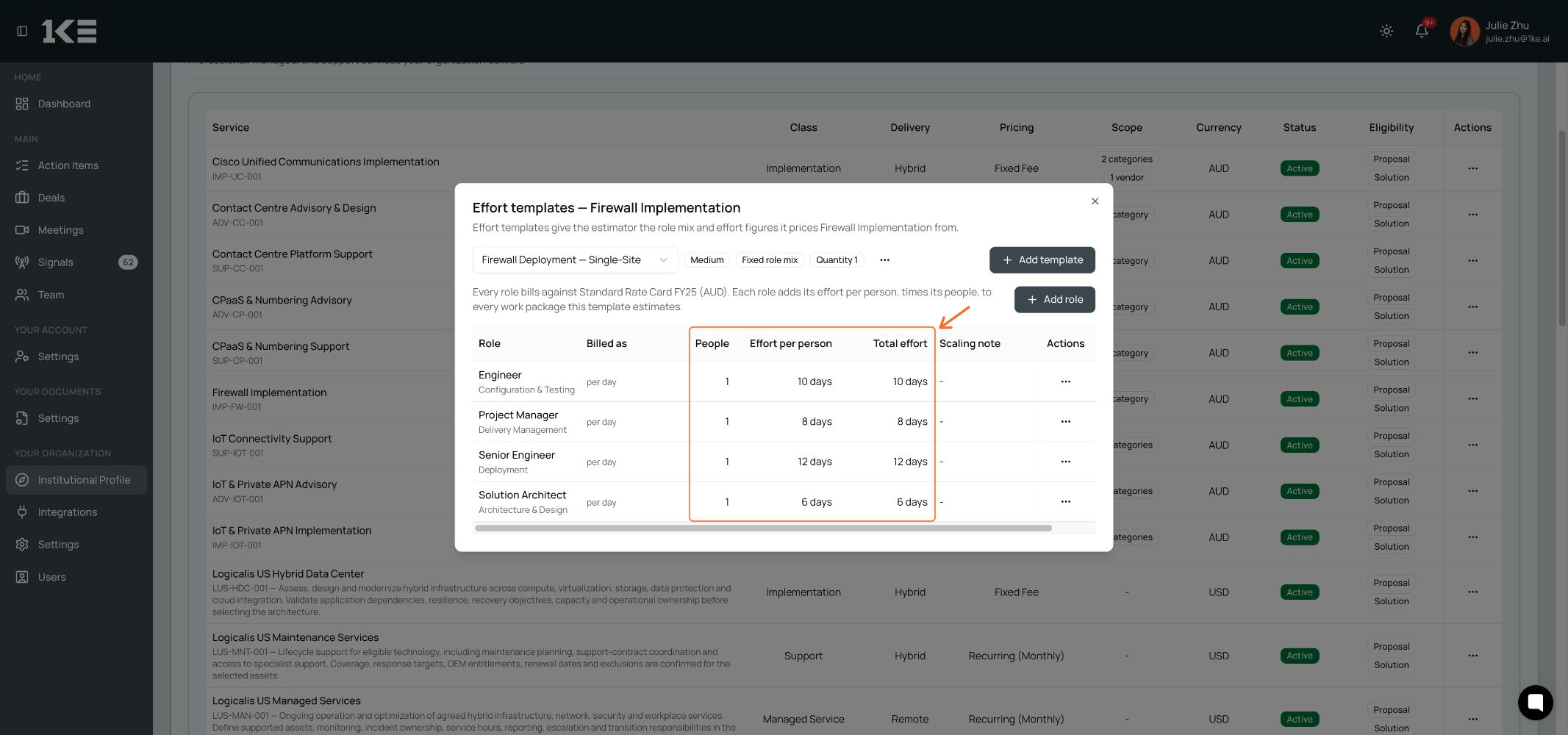
An effort template holds the standard role mix and effort for a service; its rate card supplies the rates. Use this for repeatable work. Select Service Catalogue, find the service, and choose Actions → Effort templates. Add or edit a template, choose its rate card, then maintain the role mix, People and Effort per person. People multiplies the per-person effort, including when the template uses days.
Accepting an AI estimate for a deal does not automatically create a reusable template.
Save and publish the profile changes, then generate a new solution version to use them. If prompted, refresh and approve the strategy first. Review the new version’s estimates again.
Existing versions keep the profile settings they were built with. Rebuilding an old commercial model does not replace those settings with newly published ones. If an estimate offers Newer inputs, compare the figures before choosing Reprice or Use template.
Currently, 1KE uses the matching template’s calculation. It does not ask AI to adjust that template’s hours for the deal. The template defines the standard role mix, people and effort; its rules and the applicable rate card produce the estimate.
AI effort suggestions fill the gaps where there is no suitable service or effort template. Using a template as an anchor for AI-adjusted effort is a planned follow-up, rather than the behaviour described in this guide.
Effort template: how much standard work a service needs, and which roles do it.
Rate card: the cost and sell rate for each role, in a currency and billing unit.
Fixed catalogue price: the sell price set on a service, rather than a price calculated from its delivery hours.
For example, 40 engineer hours at $200 per hour produces an $8,000 effort-derived price. That is not the same as a service with an independently set fixed sell price. If a fixed catalogue price owns the service line, the work breakdown does not add a second sell price for the same work.
See the rate-card example and the effort-template example in section 6.
No. Review, edit or accept the AI suggestion on the deal. Template setup is an optional admin task for standard, repeatable work, not a prerequisite for this review. Accepting an AI estimate does not automatically create a reusable template.
It is particularly useful for implementation and migration work where delivery effort varies with scope. For agreed fixed-price services, recurring managed services and annuity charges, the AI effort estimate is less central to the sell price, although it can still help check delivery effort.
A single deal can combine an upfront design or implementation fee with recurring managed services. Review the one-off work and recurring charges separately in Commercials.